


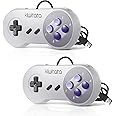
| Brand | KIWITATA |
|---|---|
| Series | 2X Classic SNES USB Controller |
| Item model number | K-Y-D002-024-KI |
| Hardware Platform | Mac, PC, Windows |
| Operating System | Linux,Windows |
| Parcel Dimensions | 14.5 x 13.89 x 4.29 cm; 200 g |
| Colour | Grey/Purple Color Keys 2pack |
| Power Source | USB Powered |
| Voltage | 12 Volts |

KIWITATA 2X Classic SNES USB Controller for PC Gamings, SNES Wired USB Game Joypad Controller for Windows XP 7 8 11 Mac Raspberry Pi
Purchase options and add-ons
| Brand | KIWITATA |
| Model name | 2X Classic SNES USB Controller |
| Compatible devices | Windows, Mac, PC, Raspberry Pi |
| Controller type | Gamepad |
| Connectivity technology | USB |
About this item
- ◆【Compatibility】Compatible with Raspberry Pi, PC, Linux ,Mac. Specifically designed for playing classic old school retro snes games on computer or laptop.This is the USB controller for PC, NOT compatible for SNES Console and not for arcade games,not for switch games.
- ◆【Ergonomic Design】Super precise cross key and function buttons,the cross direction key adopts frosted concave design, anti-sweat and anti-slip. The shape of the controller is designed to fit the contour of your hands, easy and comfortable to hold.
- ◆ 【Advanced Game Experience】PC running operating system:Windows 98/2000/ ME/XP/Vista/Win7/8/8.1/11 or later,or Mac running OS X 10.0/Mac OS X or above.It works with any emulator you wish to download and use,such as VirtuaNES(PC),sens9x,Zsens,sensgt,Uosnesw,RetroArch,OpenEmu(MAC),NESEmu and Jnes etc.
- ◆ 【USB Connection】Standard USB 2.0 port with a 1.5 meters (5ft) cable. You must manually set the buttons and directionals within the emulator you're using, and the controller not automatically assigns buttons/directional axes. Notice: please download the game emulator first before start the games, you can download the emulator “VirtuaNES” on PC and “OpenEmu”on MAC.
- ◆ 【Satisfaction】Third party controller(USB Version), not for original super Nintendo console, 12 months worry-free product assure. If there is an incompatibility on MAC or raspberry Pi, please contact the seller for a support.
Check Compatibility
Frequently bought together

Explore more from across the store
VSDISPLAY DVI VGA Audio LCD Controller Board Fit for 17 inch 4:3 1280X960 DV170YGZ-N10 DV170YGM-N10FREE Shipping by 鶹Get it by Saturday, Mar 21
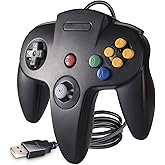
Classic N64 Controller, N64 Wired USB Remote Joystick Game Emulator Controller for Windows XP 7 8 & MAC Raspberry Pi 3 BlackKIWITATAWindowsFREE Shipping by 鶹Get it by Thursday, Mar 26
Brand in this category on 鶹
Product information
Technical Details
Summary
Additional Information
| ASIN | B01JYGYAX8 |
|---|---|
| Customer Reviews |
4.2 out of 5 stars |
| 鶹 Rank |
|
| Date First Available | Aug. 8 2016 |
| Manufacturer | 쾱ɾٲá |
| Place of Business | Shenzhen, Guangdong 51800,CN |
Warranty & Support
Feedback
Product description
Perfectly compatible with SNES games on PC/Mac
It works with most SNES games on the computer very well,such as Contra,Megaman X,Super Metroid,Mortal Kombat 2,Super Mario World,Super Mario etc,bring you real retro feels.
You can directly use these SNES controllers on your Raspberry Pi device,compatible with Raspberry Pi /Raspberry PI 2 model B /Retro Pi OS/Raspberry Pi Zero/Raspberry Pi 3/Retropi System
All the classic games now you can play on PC with SNES Controller,bring you back to the old sckool days of 8bit/16bit old classic gaming.
Support devices
★Windows 32/64 bit & Mac OS System,PC running operating system:Windows 98/2000/ ME/XP/Vista/Win7/8.1/10 or later
★Mac running OS X 10.0/Mac OS X or above
★Linux running operating system:RedHat/SUSE/Debian/Ubuntu/Gentoo etc.
Matters needing attention:
- When you use it with MAC, you can download the Emulator what you like, such as "OpenEmu", you need to plug the controller to your mac first and then open the OpenEmu emulator
- When you use it on retropi setup, you also need to plug the controller to your Raspberry Pi device first and then turn on its power.
- NOT Compatible with Android TV Box and Tesla Model 3
How to use it on MAC:
1. Download emulator: OpenEmu
2. Plug USB controller to connect with your computer
3. Open Emulator-Option-Controller-Controller Settings (Select Default Setup base)
4. Redefine USB controller' buttons ( D-pad、SELECT、START、B、A、X、Y button -- define)- confirm, please map the d-pad keys one by one .
5. Choose Emulator Rom file (game) -START-Play computer games
Package included:
2* SNES USB controllers
Product details
- Is discontinued by manufacturer : No
- Parcel Dimensions : 14.5 x 13.89 x 4.29 cm; 200 g
- Manufacturer : 쾱ɾٲá
- ASIN : B01JYGYAX8
- Item model number : K-Y-D002-024-KI
- Customer Reviews:


